 Outh
OuthLegal Case Management Software: A Comparative Buyer's Guide
Compare top legal case management software features, pricing, and security. Find the right platform for civil claims with our detailed buyer's guide.
Your firm probably doesn't need another place to store documents. It needs a reliable operating system for civil claims. Right now, evidence is scattered across email threads, shared drives, local folders, and personal calendars. A deadline moves, someone assumes another team member saw the notice, and the client calls before anyone can explain what happens next. That's the point at which legal case management software starts looking less like an upgrade and more like basic infrastructure.
The difficult part is choosing a platform that survives implementation. A polished demo can show intake forms, dashboards, automated reminders, and billing. It won't show whether your legacy files can be mapped cleanly, whether attorneys will use the workflow, or whether the system can exchange information safely with courts, agencies, and your existing applications. This guide evaluates the category through the harder lens, civil claims portfolio management, where the firm must understand not only each matter but also the value, risk, deadlines, and evidence status across the entire book.
Table of Contents
- Why Your Current System Is Failing You
- The Market Landscape and Growth Trajectory
- Core Evaluation Criteria for Legal Platforms
- Essential Features for Civil Claims Management
- Implementation Friction Points That Derail Rollouts
- Security Requirements and Court Interoperability
- Situational Recommendations by Firm Profile
Why Your Current System Is Failing You
A litigation team can look busy and still lack operational control. One attorney keeps pleadings in a local folder, a paralegal tracks medical records in a spreadsheet, and a client's critical update remains buried in an email chain titled “Re: Follow-up.” The calendar contains hearing dates, but not always the rule that generated them or the task that must follow.
That arrangement fails in predictable ways. A notice is saved to the wrong matter, a revised witness statement circulates without clear version history, or a limitations date is recorded without a second-person review. The resulting problem isn't merely wasted time. A missed deadline can create malpractice exposure, while an unanswered client message can make a client believe the firm has lost control of the claim.

The operational symptoms
The warning signs usually appear before the purchasing process begins:
- Evidence duplication: Staff download the same attachment repeatedly because nobody knows which copy is authoritative.
- Manual calendaring: A team member enters dates by hand and relies on memory to create related deadlines.
- Billing uncertainty: Lawyers reconstruct time from sent emails and meetings, then clients challenge invoices that lack a clear matter narrative.
- Portfolio blindness: Partners can describe individual cases but can't quickly compare exposure, evidence completeness, next actions, or likely resolution paths across the claims portfolio.
A basic document repository won't solve these problems. It stores files, but it doesn't necessarily connect a communication to a matter, trigger a task after an event, or show which cases need attention today.
What a proper system changes
Effective legal case management software creates a central matter record, links people and documents to that record, and automates repeatable steps. Intake can generate a matter, a conflict review, an assignment, and an evidence checklist. A court event can create internal tasks. A client portal can keep status communication outside an unsearchable inbox.
For civil claims, the most important shift is visibility. The responsible attorney should be able to see which matters have missing proof, approaching deadlines, unresolved correspondence, unbilled work, or a valuation that needs review. The platform doesn't replace judgment. It gives the team a dependable factual base for exercising it.
Practical rule: If your team can't demonstrate where a deadline, document version, client instruction, and next action live, the firm doesn't have a workflow. It has a collection of individual habits.
The Market Landscape and Growth Trajectory
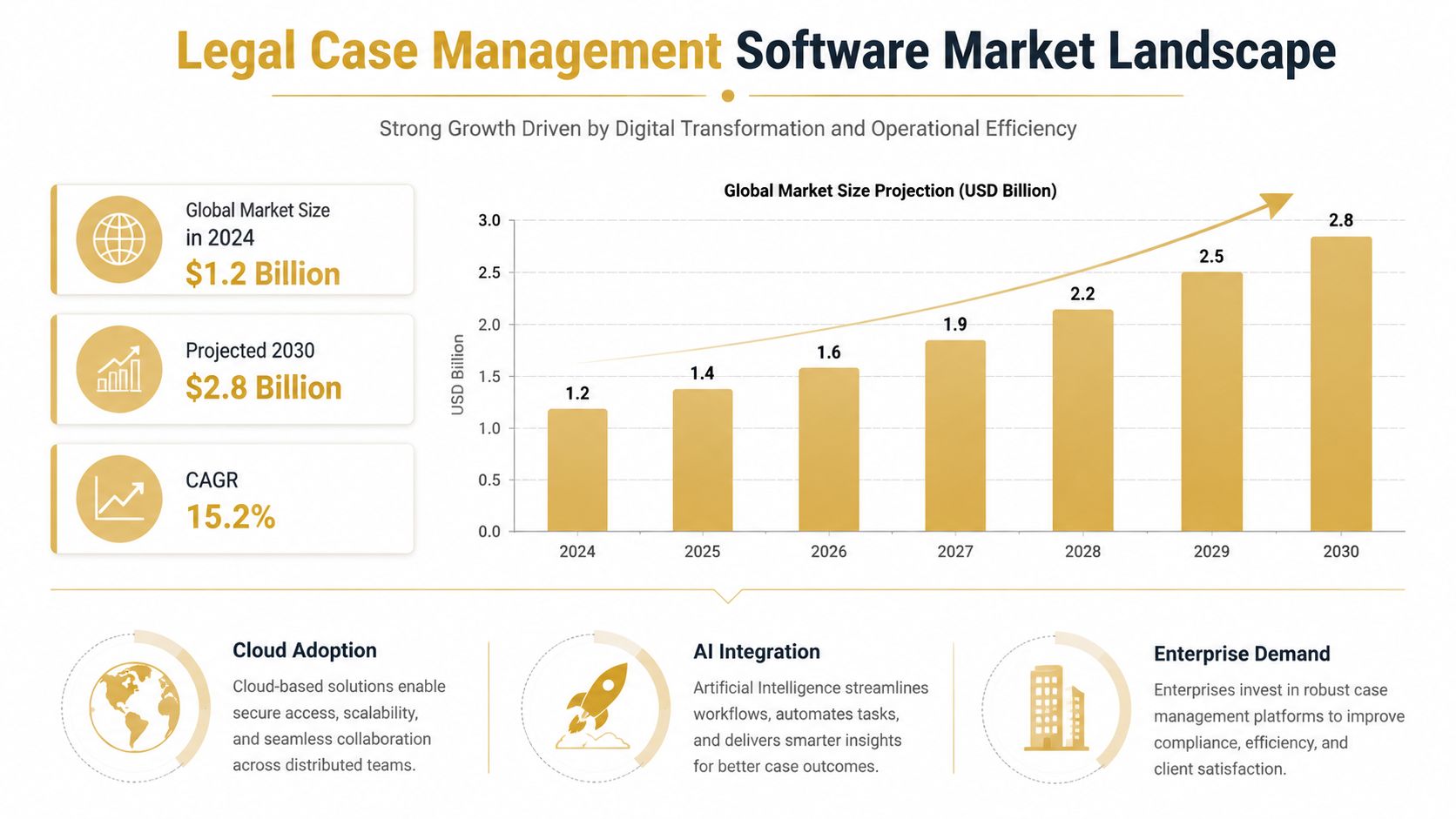
Legal case management software has moved beyond a niche category. One 2026 industry estimate placed the market at USD 0.79 billion in 2024 and projected USD 1.6 billion by 2033, implying a 7.9% CAGR from 2025 through 2033. A separate 2026 estimate put the market at USD 0.92 billion in 2026 and USD 1.86 billion by 2035, also using a 7.9% CAGR. Both projections are reported in the legal case management software market analysis.
The important point isn't which estimate you prefer. Both show a category expected to roughly double within a decade. That tells buyers to assess vendor durability, product investment, integrations, and data portability, not just today's feature list. A system selected now should still support changing workflows, new connections, and more complex reporting as the firm's portfolio grows.
Why adjacent market data matters
The broader legal practice management software segment includes case management alongside billing, calendaring, and workflow tools. A 2026 market report projected that segment at USD 2.68 billion in 2025, rising to USD 3.0 billion in 2026 and USD 4.66 billion by 2030, with an 11.6% CAGR from 2026 through 2030, as detailed in the legal practice management software market report.
That adjacent growth matters because firms increasingly expect one connected operational layer rather than isolated applications. Case records, time entries, documents, billing, client updates, and reporting need to exchange information without repeated rekeying. Buyers should therefore ask whether a vendor's roadmap supports the whole matter lifecycle or only the most visible part of it.
North America was the largest region in the adjacent market in 2025, while another 2026 case-management estimate assigned North America a 42.2% share. Those figures point to mature demand in major common-law markets, where litigation volume, discovery complexity, court deadlines, and billing requirements make operational mistakes expensive. The ecosystem is expanding, but that doesn't mean every product deserves your data. It means firms should demand credible migration plans, stable integrations, and a clear answer on how the platform will support portfolio-level work.
For teams assessing AI for lawyers, the sensible question is not whether a vendor uses artificial intelligence in its marketing. Ask where automation sits in the workflow, what human review remains necessary, and whether the system preserves a traceable record of decisions.
Core Evaluation Criteria for Legal Platforms
A feature checklist is too shallow for a civil claims practice. Evaluate each platform against the operational failure it must prevent. The five dimensions below are a useful starting point, but the quality of execution matters more than the number of checkboxes.
Automation depth
Adequate systems create reminders and templates. Stronger platforms connect events to actions, support intake and conflict workflows, assemble documents from structured matter data, and send controlled client status updates. Review whether automation is configurable by matter type and jurisdiction, or whether staff must create every rule manually.
Billing and trust accounting
Billing should connect time, expenses, invoices, approvals, and client communications. Trust accounting deserves separate scrutiny. A platform with native IOLTA-safe accounting is materially different from one that stores billing data while requiring a separate accounting product or spreadsheet for client funds. Ask for a live demonstration of deposits, transfers, reconciliations, permissions, and audit history.
Integrations
An integration is useful only if it prevents duplicate work. Test email, calendaring, document storage, accounting, e-signature, intake, and court-related processes using your own workflow. An open API helps, but it doesn't compensate for weak documentation or an integration that merely exports a file.
Support quality
Support determines whether a problem becomes a short interruption or a stalled rollout. Ask who handles migration questions, whether support understands legal workflows, how training is delivered, and what happens when a configuration affects billing or trust accounting. “Self-service knowledge base” isn't enough for a firm moving active matters.
Pricing transparency
Compare the full operating cost, not the advertised seat price. Include implementation, migration, premium integrations, storage, training, custom work, and the cost of maintaining another application where the platform falls short. A lower subscription can be expensive if it forces staff to reconcile disconnected systems.
The legal practice management software comparison evaluates platforms across automation, billing and trust accounting, integrations, support, and price. Use those dimensions as a buying discipline, not as a substitute for testing your own matters.
Platform Evaluation Matrix
| Platform | Automation Depth | Trust Accounting | Integrations | Support Quality | Pricing Model |
|---|---|---|---|---|---|
| All-in-one legal practice platform | Intake, tasks, templates, reminders, status workflows | Prefer native IOLTA-safe controls | Email, calendar, accounting, storage, e-signature | Dedicated onboarding and legal workflow support | Transparent subscription with implementation costs stated |
| Claims-focused portfolio platform | Evidence workflows, claim elements, valuation, portfolio review | Usually requires a separate firm accounting system | Email, evidence, analytics, attorney matching | Specialist product support and workflow guidance | Subscription or matter-based access, subject to scope |
| Enterprise legal operations suite | Deep workflow orchestration, reporting, permissions, custom rules | Native or tightly governed integration required | API, document, finance, identity, reporting, court-related connections | Account team, implementation partner, escalation process | Enterprise contract with configuration and integration fees |
| Lightweight matter tracker | Basic tasks, contacts, notes, and file storage | Often bolt-on or external | Common office tools, limited workflow connectivity | General software support | Lower subscription, often per user |
| Custom-built or heavily configured system | Potentially extensive | Depends on design and controls | Broad if APIs and ownership are clear | Internal team or contracted specialists | Project cost plus ongoing maintenance |
The matrix should be tested against actual matters, not a fictional demo. Guidance on legal technology tools is useful for broadening the shortlist, but your final decision should turn on evidence handling, deadlines, accounting controls, and adoption.
Essential Features for Civil Claims Management
Civil claims require more than a digital filing cabinet. Your platform should help the team answer four questions quickly: What happened? What must be proved? What happens next? What is the portfolio worth under different outcomes?
Start with evidence, not folders
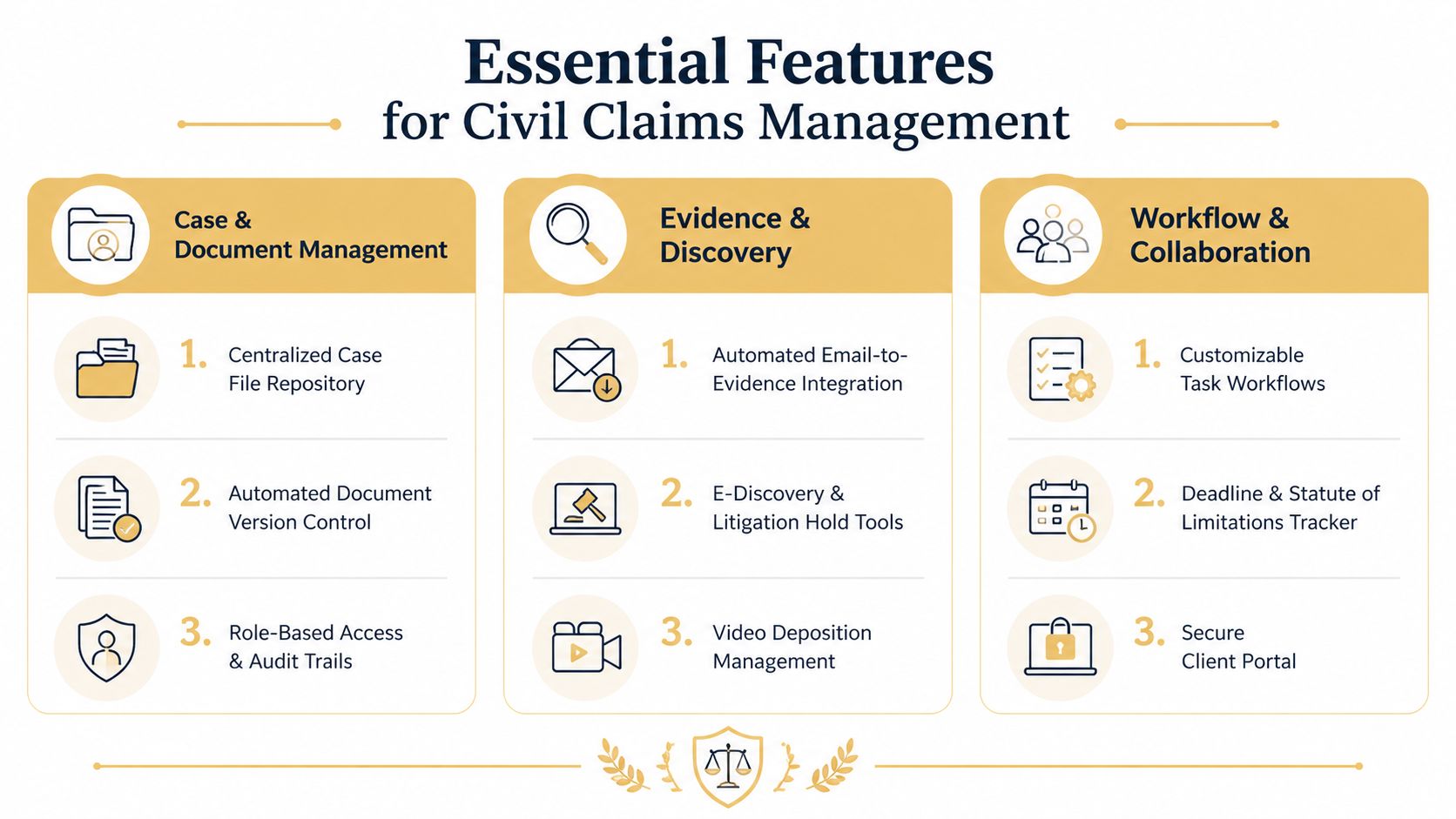
Automated email integration should surface relevant messages, attachments, and updates without requiring staff to file every item manually. The system should preserve the relationship between an email and the matter, track document versions, and support role-based access and audit trails. For discovery-heavy work, look for litigation hold controls, search, export, and a defensible record of who accessed or changed information.
A paralegal reviewing an employment claim shouldn't have to search five inboxes for the manager's response, the personnel document, and the follow-up instruction. The platform should bring those materials into the matter record while leaving a clear path for human review and classification.
Make the portfolio visible
A civil claims dashboard should show more than open and closed matters. It should display evidence gaps, claim elements, upcoming deadlines, current stage, estimated value, and unresolved tasks across the portfolio. Confidence intervals can help teams distinguish a central estimate from a wider range of plausible outcomes, while benchmark comparisons provide context without pretending that historical data determines an individual result.
Outh is one example of a claims-focused platform. It supports case discovery across 100+ categories, claim-element checklists, email-based evidence management, valuation using P10, P50, and P90 confidence intervals, portfolio dashboards, market benchmarks, and plain-language decoding of legal correspondence. Those functions complement, rather than replace, a firm's ethical, accounting, and litigation systems.
Treat calendars and collaboration as risk controls
Jurisdiction-aware calendaring should account for court-specific rules, deadline relationships, reminders, assignments, and review points. A generic date field isn't enough when a filing triggers service tasks, response dates, internal approval, and client communication.
Secure client portals should let clients exchange documents, review status information, and respond to requests without expanding the firm's uncontrolled email archive. The portal also needs permissions that distinguish what a client, co-counsel, expert, insurer, or internal team member can see.
A useful civil claims checklist looks like this:
- Matter repository: Centralize pleadings, correspondence, evidence, notes, and financial records.
- Version control: Show the authoritative document and preserve prior versions.
- Evidence discovery: Connect email, attachments, holds, deposition materials, and review tasks.
- Claim elements: Track the proof required for each theory and identify missing evidence.
- Valuation analysis: Compare case estimates, ranges, benchmarks, and resolution stages.
- Workflow controls: Trigger repeatable tasks for intake, disclosure, mediation, filing, and closure.
- Client collaboration: Provide secure messaging, document exchange, and controlled updates.
- AI review with supervision: Decode correspondence or classify material, but retain attorney oversight and an audit trail.
Implementation Friction Points That Derail Rollouts
Cloud delivery is no longer a sufficient implementation strategy. Cloud-based deployment held an estimated 68.8% share in 2026, according to the legal software implementation analysis. That means the differentiator has shifted from “can we access it online?” to “can we migrate cleanly, configure responsibly, and get people to use it?”
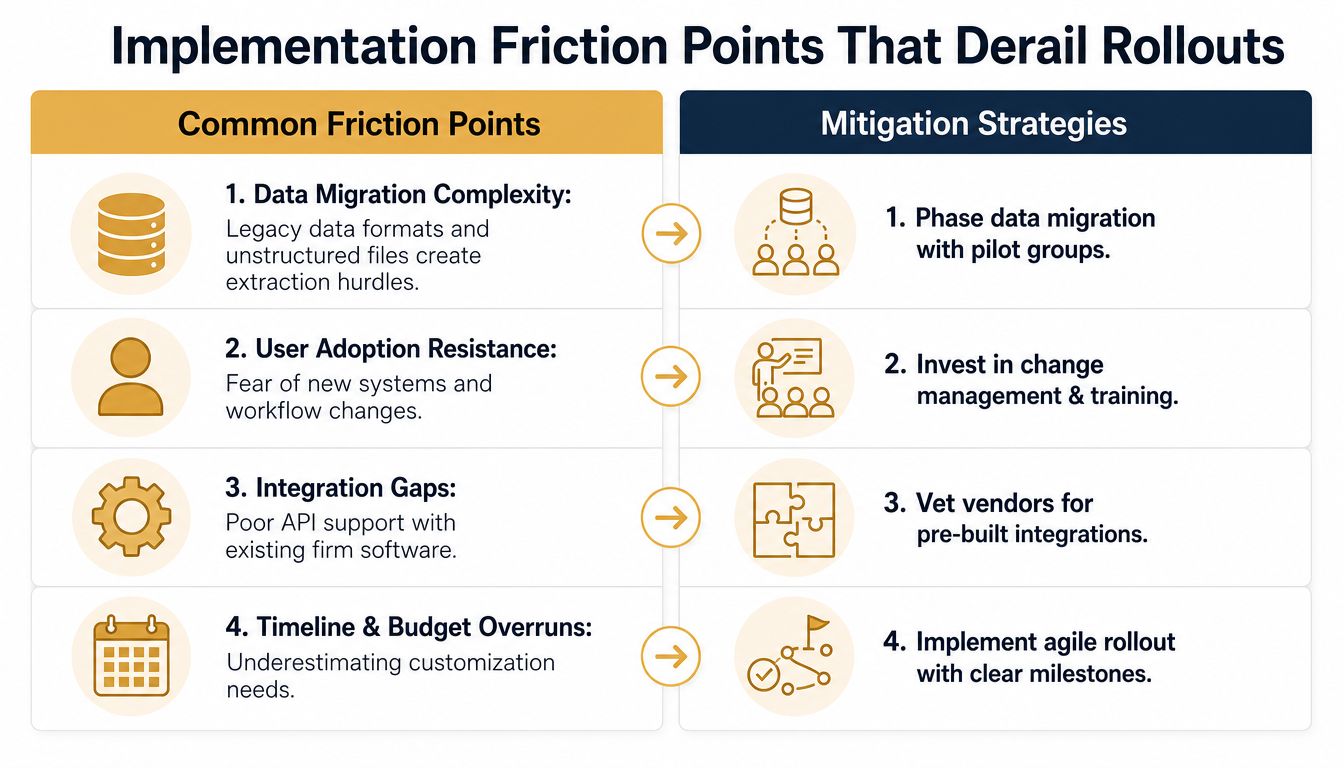
Data migration is a legal project
Legacy data rarely arrives in neat matter folders. It includes duplicate files, inconsistent naming, outdated contacts, unclear privilege labels, broken links, and documents saved outside the official system. Before signing, require a migration inventory, field-mapping document, exception report, validation process, and rollback plan.
Ask the vendor to migrate a representative pilot set. Don't accept a clean sample chosen by the vendor. Include a complicated matter, an older matter, a high-volume matter, and a matter with unusual evidence or billing requirements.
Configuration can become permanent complexity
Every customization feels reasonable during procurement. A special status, a custom field, or an exception workflow may later make reporting harder and training more expensive. Configure only what supports a repeatable business rule, a legal control, or a meaningful management decision.
Warning signs include vague answers about what requires professional services, demos that avoid your actual workflow, and promises that “anything is possible” without a written scope. The right question is not whether the platform can be changed. It's what the change will cost to maintain when the vendor updates the product.
Adoption fails when training follows launch
Attorneys and staff need role-specific workflows, not a generic tour. A paralegal needs to know how to intake evidence and manage deadlines. A billing coordinator needs to understand time, invoices, and trust controls. Partners need portfolio dashboards and exception reporting.
Run a controlled pilot, appoint internal champions, publish a short operating protocol, and measure completion of required actions. If the firm continues allowing parallel spreadsheets and private folders indefinitely, the old system will remain the primary system.
Fragmented stacks create hidden work
An attractive platform can still fail if it doesn't connect to email, calendaring, accounting, storage, e-signature, identity management, and required filing processes. List the integrations that are essential before procurement, then test each one with real data and permissions.
Buying test: Ask the vendor to show the migration exception report, the configuration boundary, the training schedule, the integration failure process, and the export format. If the answer is vague, the risk is already visible.
A short video can help your team frame the rollout conversation before vendor demos:
Teams evaluating AI legal tools should apply the same discipline. Automation may reduce review effort, but it also creates questions about source data, human approval, retention, explainability, and access.
Security Requirements and Court Interoperability
Private-firm software now sits inside a larger justice ecosystem. In June 2026, the U.S. Judicial Conference approved a USD 700–800 million, six-year program to replace the federal CM/ECF system with a secure cloud platform, according to the court case management software market research. In July 2026, Nigeria's Supreme Court activated a national Case Management System for e-filing, digital records, and case tracking, as reported in the same market context.
These developments matter to firms because cases cross organizational boundaries. A platform may need to support court-specific filing standards, structured exports, secure collaboration with co-counsel, agency communications, and long-term access to records. A smooth internal dashboard is irrelevant if the system makes court exchange, audit production, or retention management unreliable.
Security controls must be operational
Require encryption in transit and at rest, multi-factor authentication, granular permissions, audit trails, backup and recovery documentation, and a clear incident-response process. Ask where data is stored, who can access it, how access is logged, and how the vendor separates customer environments.
Retention deserves equal attention. A firm should be able to apply matter-level retention rules, legal holds, disposition approvals, and export procedures. Deletion must be controlled, documented, and consistent with professional obligations and court requirements.
Interoperability should shape the shortlist
Court-connected work demands more than a generic API. Ask whether the platform supports required document formats, metadata, filing status, service records, and immutable activity history. Test how it handles rejected filings, corrected submissions, duplicate records, and changes in user permissions.
Firm size affects the answer. A small practice may prioritize secure portals, dependable exports, and straightforward permissions. A larger firm or legal department may need identity integration, separate business units, custom APIs, data-loss controls, and formal vendor risk reviews. Pricing should reflect those requirements. Paying for enterprise controls you won't use is wasteful, but selecting a cheap system that requires manual reconciliation at every court interaction is false economy.
Situational Recommendations by Firm Profile
The right platform depends on the firm's operational burden, not its headcount alone.
| Firm profile | Recommended category | Priorities | Implementation approach |
|---|---|---|---|
| Solo or small practice | Simple all-in-one legal practice platform | Matter records, calendaring, billing, secure sharing, ease of use | Pilot active matters, limit customization, train by role |
| Mid-size civil claims firm | Practice platform with strong automation and trust controls | Workflow rules, native or tightly integrated trust accounting, reporting, portals, integrations | Migrate by matter group and establish internal owners |
| Large firm or legal department | Enterprise legal operations suite | Security governance, portfolio reporting, APIs, identity controls, interoperability, retention | Use formal discovery, staged migration, testing, and change management |
| Claims-focused team | Platform or companion tool built around evidence and portfolio analysis | Claim elements, evidence intake, valuation ranges, benchmarks, correspondence review | Connect to the firm's authoritative matter and accounting systems |
Solo practitioners and small firms should avoid buying an enterprise system they'll never configure. Choose a platform that makes daily intake, deadlines, documents, time, billing, and client communication easy enough to use consistently.
Mid-size firms need stronger controls. Native or tightly integrated trust accounting, automated workflows, role permissions, reporting, and a serious migration plan matter more than a long list of optional features. Don't let every practice group invent its own process.
Large firms and legal departments should treat procurement as architecture. Demand security evidence, integration documentation, export capability, retention controls, implementation accountability, and portfolio reporting before comparing subscription prices.
For employment, personal injury, civil rights, and education claims, add a claims intelligence layer where it fits. Outh offers case discovery, claim-element tracking, evidence and communication management, valuation ranges, portfolio dashboards, benchmarks, and attorney matching. Use it alongside the firm's controlled matter system where the goal is to understand claim viability and portfolio exposure, not to replace legal advice or accounting controls.
Outh helps teams organize civil claims, surface evidence from communications, track claim elements, and review valuation ranges across a portfolio. Visit Outh to see how its claims-focused intelligence can support a more disciplined software and workflow strategy.