 Outh
Outh10 AI Legal Tools for Research, Claims, and Contracts
Compare 10 ai legal tools for discovery, research, drafting, valuation, review, and translation, with workflow and privacy guidance.

The most popular advice about AI legal tools is to find the “best” one. That's the wrong starting point. A person trying to understand whether a civil claim is viable needs discovery, evidence organization, valuation context, and help interpreting correspondence. A law firm may need authoritative research, litigation drafting, or matter-level document analysis. An in-house team may care more about contract intake, playbooks, approvals, repository search, and post-signature obligations.
This list follows those workflows rather than treating every platform as interchangeable. It compares tools for discovering and valuing claims, researching authority, drafting, reviewing contracts, analyzing evidence, and implementing AI inside a legal operation. It also separates informational support from legal advice. Before uploading sensitive material, ask where the tool operates, which jurisdictions and sources it covers, whether your data is used for model training, what access controls exist, and who must review the output before it reaches a client, court, or opposing counsel.
The market is moving quickly. A major 2025 survey found that 26% of legal organizations actively used generative AI, compared with 14% in 2024, while document review, legal research, and summarization ranked as the leading use cases (LawNext's coverage of the Thomson Reuters survey). Adoption, however, doesn't remove the need for supervision. It makes choosing the right workflow and review standard more important.
Table of Contents
- 1. Outh
- 2. Lexis+ with Protégé
- 3. Westlaw Precision with AI-Assisted Research
- 4. CoCounsel Legal
- 5. Vincent AI by vLex
- 6. Harvey
- 7. Spellbook
- 8. Ironclad AI
- 9. LegalOn
- 10. EvenUp
- Top 10 AI Legal Tools: Feature Comparison
- Build a Safer Legal AI Workflow
1. Outh
Outh starts before conventional legal research. It treats a possible civil claim as something to investigate, organize, and compare, giving individuals a way to move from an unclear event toward a structured understanding of claim elements, evidence, potential value, and counsel.
Its AI-powered discovery covers 100+ categories, including employment, personal injury, civil rights, and education matters. The valuation engine presents P10, P50, and P90 confidence intervals, rather than a single figure that could imply more certainty than the underlying facts support. Outh says its models draw on 2,400+ verdict data points and quarterly-refreshed public datasets from the EEOC, BLS, DOJ, and IRC. The platform also reports 87% valuation accuracy, but users should treat that as a platform claim and understand that estimates remain dependent on the information supplied and the availability of comparable public records.
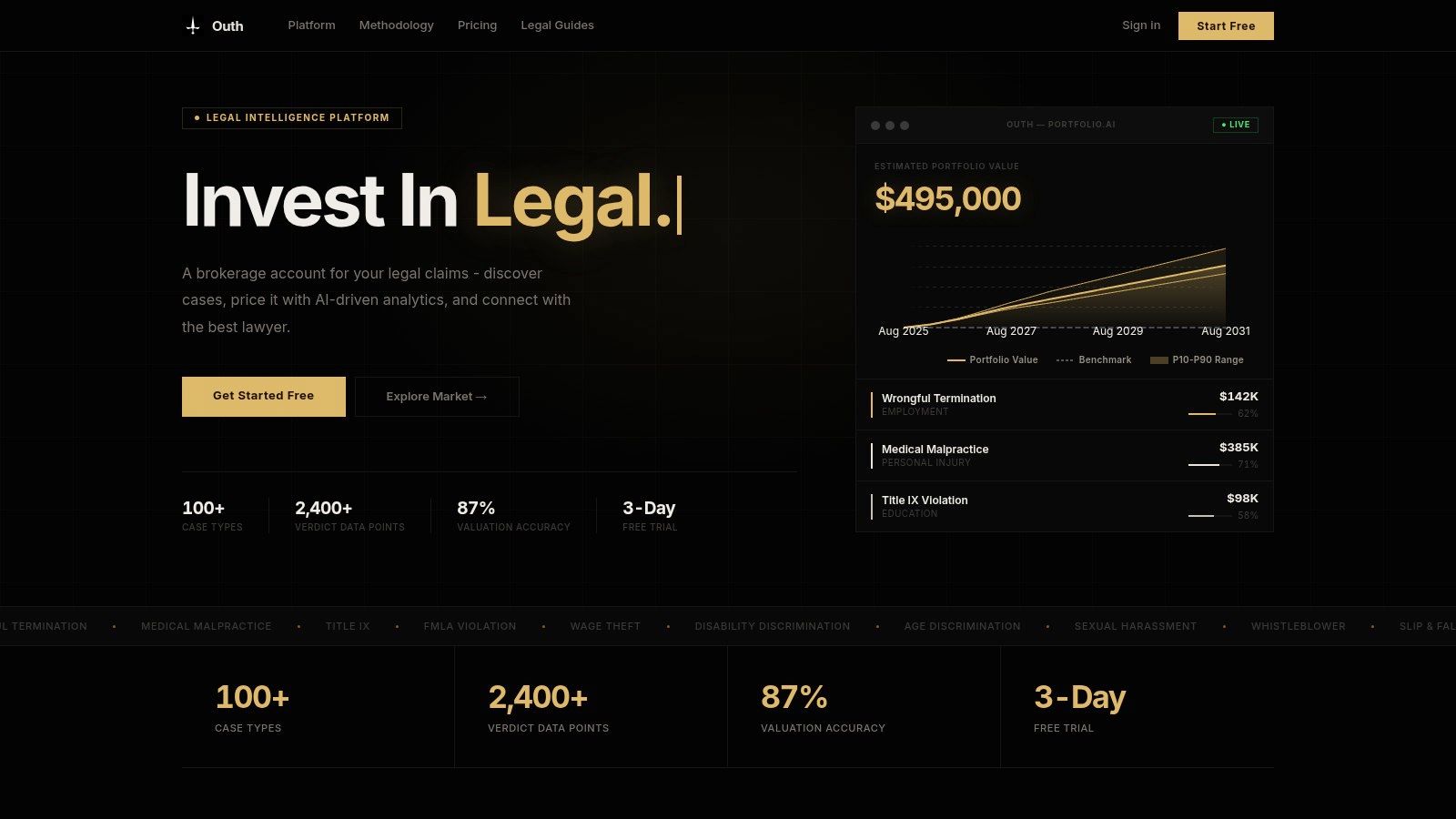
Best fit for claim discovery and preparation
The strongest distinction is workflow order. A claimant can use the case-element checklist to identify what must be proven, then use the evidence-management inbox to surface documents and updates from connected communications. The AI Email Decoder translates legal correspondence into plain English and flags possible effects on settlement posture and timing, which can reduce the practical barrier created by legal terminology.
Outh also supports attorney matching based on specialty fit, proximity, and verified success metrics, with fee information that includes estimated contingency ranges, retainers, and a $0-retainer filter. That combination is more useful for a person comparing representation options than a research database would be, because it connects claim understanding with the next decision about counsel.
Practical rule: Use Outh to structure questions, evidence, and valuation expectations. Don't treat an estimated range as a legal conclusion, settlement promise, or substitute for advice from a qualified attorney.
The limitations matter. Outh focuses on U.S. matters, and its statistical estimates may not capture unusual facts, confidential settlements, or incomplete evidence. It isn't a law firm, and users remain responsible for deciding whether to seek legal advice and what material to share.
2. Lexis+ with Protégé
Lexis+ with Protégé is designed for the point in the workflow where a legal professional needs research grounded in a substantial legal information system. Its conversational and agentic features can help break down a research question, draft content, and analyze documents while linking answers to Lexis sources and the open web.
The key differentiator is the connection to Lexis content and Shepard's validation. That doesn't make an AI response self-authenticating, but it gives a researcher a more direct path to inspect cited authority and assess whether cited cases remain reliable. The platform also combines research with practice guidance and analytics, which can be more useful than a standalone chatbot for a team that already works inside the LexisNexis environment.
Where it fits
Lexis+ with Protégé makes the most sense for research-heavy litigation and organizations that already pay for Lexis content. It's less compelling as a first tool for a claimant who needs help discovering a possible claim, organizing evidence, or finding counsel. A user researching a statute or case still needs to open the underlying authority, confirm the quoted language, check procedural posture, and determine whether the jurisdiction makes the authority relevant.
Teams considering deployment should examine procurement, access controls, document permissions, auditability, and the treatment of uploaded work product. Pricing isn't publicly listed in the supplied product information, so a meaningful comparison requires a vendor quote and a clear definition of included content and AI usage.
For a broader explanation of how attorneys can place AI inside existing research and drafting processes, see this guide to AI for lawyers.
3. Westlaw Precision with AI-Assisted Research
Westlaw Precision with AI-Assisted Research targets a similar research moment but uses the Westlaw authority and editorial ecosystem. Its AI-assisted answers link to Westlaw content, while Precision adds filters for issues, outcomes, and fact patterns. That combination matters because legal research often turns on narrowing a broad question to cases with a sufficiently similar procedural and factual shape.
KeyCite integration gives users a way to validate cited authorities within the Westlaw environment. Editorial enhancements and deep primary and secondary coverage can help a firm standardize research practices, particularly when several lawyers need to work from the same source platform.
The practical trade-off
Westlaw Precision is strongest when the team's research habits already center on Westlaw. Moving between an AI answer, cited authority, KeyCite signals, and granular filters can reduce friction. It doesn't eliminate the need to read the cases or determine whether a result supports the proposition for which a lawyer intends to cite it.
Available plan tiers include an online pricing flow for small firms, but overall cost depends on the Westlaw package and the features attached to it. That makes the purchasing question less about whether AI research sounds useful and more about whether the organization will use the broader research subscription enough to justify the package.
For a workflow-focused comparison of research platforms, consult these legal research tools. The important distinction is source coverage and verification, not conversational style alone.
4. CoCounsel Legal
CoCounsel Legal, originally Casetext and now part of Thomson Reuters, is broader than a research assistant. It supports drafting, contract review, case-file analysis, summarization, and multi-step workflows across litigation and transactional work. Its value therefore depends on whether a team needs one assistant to handle several document-centered tasks rather than a tool limited to searching authority.
The platform can analyze contracts, discovery materials, and case files, while available bundles can pair it with Westlaw and Practical Law. That ecosystem connection gives organizations a route from research to drafting and practical guidance, although each generated answer still needs review against source documents and the facts of the matter.
Human review remains the control point. A faster draft is useful only when a qualified professional verifies its facts, citations, assumptions, and confidentiality handling.
The Essentials tier's stated posture that user content isn't used to train models may matter to buyers evaluating confidential work product. Procurement teams should still read the applicable terms, understand retention and deletion controls, and confirm which features and integrations are included in the selected tier.
CoCounsel is best aligned with organizations already using Thomson Reuters products or willing to standardize around them. Pricing is typically enterprise and quote-based, so smaller teams should test a defined workflow, such as summarizing a matter file or comparing contract provisions, before committing to a broad deployment.
5. Vincent AI by vLex
Vincent AI by vLex is a research and document-analysis option for firms that want U.S. and international coverage without centering their entire information stack on LexisNexis or Thomson Reuters. It synthesizes natural-language research across case law and secondary materials, and it supports document analysis and similar-passage retrieval.
That cross-jurisdictional reach is the main practical reason to consider it. A firm handling multi-state questions, international issues, or comparative research may value the ability to search beyond a single local perspective. Its connection with the wider vLex library, now combined with Fastcase content, gives the product a different coverage profile from the two dominant U.S. research ecosystems.
Who should test it
Small and midsize firms may find Vincent AI attractive when price positioning, jurisdictional breadth, and compatibility with a Clio-centered practice stack matter. It isn't a replacement for every practice-guidance resource available through the larger research providers, and pricing is generally quote-based.
A sensible evaluation would use real, de-identified research questions from the firm. Compare the cited authorities, jurisdictional precision, treatment of adverse authority, and ease of opening the underlying sources. A polished synthesis that omits a controlling case is more dangerous than a slower search that makes the research path visible.
Vincent is therefore a fit decision, not a universal ranking. It may be particularly useful where cross-jurisdictional research is routine, while a firm focused on a narrow U.S. practice may place greater weight on the depth of its existing primary-law subscription.
6. Harvey
Harvey is built for large law firms and in-house legal departments handling complex, high-volume work. Its platform combines drafting and research with firm knowledge-base grounding, large-scale document review, custom workflow agents, shared workspaces, and security controls.
That architecture changes the buying question. A solo practitioner looking for occasional drafting help may not need shared enterprise workspaces or custom agents. A large organization reviewing a matter-level document set may care more about permissions, repeatable workflows, knowledge repositories, and the ability to coordinate outputs across a team.
Scale creates its own risk
Enterprise capability doesn't automatically produce safe adoption. A firm needs defined owners for prompt design, source selection, output review, access permissions, and incident response. It also needs to determine whether the platform can handle the specific categories of confidential information in its matters and whether integrations preserve the firm's document-management controls.
Harvey's pricing is custom and enterprise-oriented, and it generally isn't self-serve for solo users. Its value depends on the scope of deployment, integration work, and sustained adoption across the teams that will use it. A pilot should therefore measure a complete workflow, such as a repeatable document review or drafting process, rather than counting impressive demonstrations.
7. Spellbook
Spellbook is the most workflow-specific option in this list for transactional lawyers who live in Microsoft Word. Its Word add-in supports review, drafting, comparison, questions, playbooks, and a multi-document Associate agent, allowing attorneys to work with tracked redlines instead of moving repeatedly between a browser and a document editor.
That low-friction design is its central advantage. A small or midsize legal team can introduce contract assistance without replacing its existing drafting environment. Playbooks can also help translate a team's preferred positions into repeatable review instructions, although lawyers still need to determine whether suggested changes fit the deal, counterparty, governing law, and business risk.
Contract fit, not research breadth
Spellbook isn't a full legal research suite. It's better evaluated by asking whether it handles the clauses, fallback positions, redline conventions, and document formats that the team encounters. The vendor describes zero-data-retention options and SOC 2 Type II security, but a buyer should confirm the exact plan terms and how those controls apply to the intended use.
Pricing is custom and seat-based, with a 7-day free trial for legal teams described in the supplied product information. That trial should be used to test difficult clauses and realistic negotiations, not only clean template agreements. The product is a strong candidate when Word-native contract work is the bottleneck and a full contract-lifecycle replacement would be excessive.
8. Ironclad AI
Ironclad AI sits inside a broader contract lifecycle management system. Its AI Assistant and Agents support intake, drafting, negotiation, repository questions, and data extraction, while Smart Import helps bring information out of legacy contracts. Playbooked workflows, permissions, analytics, and e-signature extend the system beyond the review screen.
This makes Ironclad different from a Word add-in. It can connect the request for a contract to approval, execution, storage, and post-signature tracking. For an in-house legal operations team, that end-to-end path may matter more than the quality of an isolated clause suggestion because the organization also needs visibility into ownership, status, obligations, and repository data.
The implementation threshold
Ironclad delivers its strongest value when an organization adopts the CLM broadly. A department that only wants occasional contract summaries may be paying for a larger operating model than it needs. Pricing is quote-based, and heavy AI use may involve AI credits, so buyers should model expected intake, review, extraction, and repository workloads before signing.
Permissions deserve special attention. Legacy contracts may contain sensitive commercial terms, and repository intelligence can make those terms easier to find. The implementation plan should define who can ask questions, which contracts are indexed, how extracted fields are checked, and how corrections flow back into the system.
For a broader view of legal technology categories and implementation choices, review these legal technology tools. Ironclad is a fit for organizations seeking contracting infrastructure, not just a faster redline.
9. LegalOn
LegalOn focuses on contract review, playbooked drafting, intake, and repository intelligence. Its Word add-in gives lawyers an in-document workflow, while the web platform and Vault repository support broader review and search. Intake and triage agents add an operational layer for directing requests and managing matters.
The product's stated emphasis on unlimited AI review can make its economics easier to assess for teams with recurring contract volume, but “unlimited” shouldn't end the evaluation. Legal teams still need to understand usage boundaries, plan tiers, supported jurisdictions, playbook configuration, and what happens when a contract falls outside the standard workflow.
A practical fit test
LegalOn offers U.S. and England and Wales jurisdiction playbooks, along with SOC 2 and ISO certifications. Those details are useful starting points, but jurisdictional labels don't replace legal review. A team should test whether the playbook captures its actual fallback positions, approval rules, and risk tolerances.
Pricing isn't posted publicly and is quote-based. The platform is positioned to be accessible to small legal teams while scaling to larger departments, so a pilot should include intake through final review rather than only clause suggestions. LegalOn is not a case-law research tool. Its strongest use is contract operations, particularly where the team wants a combination of Word access, centralized repository intelligence, and repeatable review rules.
10. EvenUp
EvenUp is a vertical platform for personal-injury plaintiff firms. It addresses a workflow that general legal assistants often handle poorly, including intake triage, medical-record summaries, chronology development, damages analysis, value-driver detection, demand-package drafting, and negotiation support.
That specialization is its main reason to consider it. A personal-injury firm doesn't need a contract playbook tool to solve medical-record preparation, and a general research platform won't necessarily organize treatment history into a demand-ready narrative. EvenUp's case-based pricing model is also designed around the economics of individual matters, although pricing isn't public.
Keep the scope narrow
EvenUp isn't a general legal research platform. It's most relevant to firms with moderate-to-high personal-injury case volume and a recurring need to transform medical records into settlement materials. The vendor provides published trust and security information, but firms handling protected health information should verify the exact security, retention, access, and contractual requirements that apply to their matters.
A useful pilot would compare source-document traceability, chronology completeness, identification of gaps or pre-existing conditions, and the accuracy of demand-package facts. Attorneys should also review every generated package before sending it. The product can reduce preparation friction, but it can't make credibility, causation, damages, or settlement judgment automatic.
Top 10 AI Legal Tools: Feature Comparison
| Platform | Core features ✨ | Quality/Accuracy ★ | Pricing/Value 💰 | Target audience 👥 | Unique selling point(s) ✨ |
|---|---|---|---|---|---|
| Outh 🏆 | AI case discovery (100+ categories); P10/P50/P90 valuation; evidence inbox; AI Email Decoder | ★★★★☆ (≈87% valuation accuracy) | 💰 Subscriptions (monthly/quarterly/annual); 3‑day free trial; fee transparency | 👥 Individuals, plaintiffs, self‑represented, counsel‑seekers | ✨ Portfolio-style claim valuation; attorney matching; plain‑English email decoding |
| Lexis+ with Protégé | Conversational research & drafting; linked citations; Shepard's validation | ★★★★★ (authoritative Lexis content) | 💰 Enterprise/quote; best for existing Lexis users | 👥 Law firms, legal researchers, enterprise | ✨ Shepard's-backed AI for citable, grounded answers |
| Westlaw Precision (Thomson Reuters) | AI answers tied to Westlaw authority; Precision filters; KeyCite integration | ★★★★★ (trusted editorial linkage) | 💰 Premium/package-dependent; online pricing flow | 👥 Firms standardizing on Thomson Reuters | ✨ Granular filters for issues, outcomes & fact patterns |
| CoCounsel Legal (Thomson Reuters) | Multi-step drafting & review agents; contract & litigation workflows; TR content integration | ★★★★☆ (TR content backbone) | 💰 Quote/enterprise; bundle options | 👥 Mid‑to‑large firms already in TR ecosystem | ✨ Multi-step agents; enterprise security & content depth |
| Vincent AI (vLex) | NL research synthesis; document analysis; cross‑jurisdiction retrieval | ★★★★☆ (competitive coverage) | 💰 Quote; competitive for small/midsize firms | 👥 Small‑midsize firms, Clio-centric practices | ✨ Cross-jurisdiction reach; alternative to major duopoly |
| Harvey | Drafting, research, bulk review; custom agents & shared workspaces | ★★★★☆ (enterprise-grade, scalable) | 💰 Custom/enterprise pricing; deployment-based | 👥 Large law firms, in‑house legal teams | ✨ Scalable enterprise agents, secure shared workspace |
| Spellbook | Word add‑in for Review/Draft/Compare; playbooks & tracked redlines | ★★★★☆ (Word-native efficiency) | 💰 Seat/custom pricing; 7‑day trial | 👥 Transactional teams; small‑midsize firms | ✨ Minimal workflow change; playbooked redlines in Word |
| Ironclad AI (Ironclad CLM) | CLM with AI: intake, extraction, negotiation, analytics | ★★★★☆ (full‑stack contracting) | 💰 Quote; best value with org‑wide CLM adoption | 👥 In‑house legal ops, enterprises | ✨ End‑to‑end contracting + repository intelligence |
| LegalOn | Unlimited AI review & redlining; Word add‑in; intake/triage agents; Vault | ★★★★☆ (scalable contract review) | 💰 Quote/plans; enterprise tiers | 👥 In‑house teams seeking scalable contract review | ✨ Unlimited review + playbooks and Vault intelligence |
| EvenUp (Personal‑Injury AI) | PI intake triage; medical summaries; AI demand packages & negotiation support | ★★★★☆ (PI workflow efficiency) | 💰 Case‑based pricing; quote | 👥 Plaintiff personal‑injury firms | ✨ Purpose‑built PI tooling: medical chronology & demand generation |
Build a Safer Legal AI Workflow
The safest way to select AI legal tools is to begin with the task that consumes time or creates avoidable uncertainty. A claimant may need to discover possible claims, organize evidence, understand correspondence, estimate a range, and find suitable counsel. A litigation team may instead need authoritative research with linked citations, matter-file analysis, and drafting. An in-house contracting department may need intake, playbooks, extraction, approvals, repository search, and post-signature tracking.
The adoption data supports that task-first approach. A 2026 industry report found that 69% of legal professionals used generative AI for work, while firm-level adoption was lower, at 46% for general-purpose AI and 34% for legal-specific tools (LawNext's report on the 8am findings). Individual experimentation is moving faster than institutional rollout, which means procurement teams need to solve governance and workflow fit, not just provide access.
Use this sequence:
- Define the legal task: Choose discovery, valuation, research, drafting, contract review, evidence preparation, or lifecycle management. Don't compare a claimant platform with a research database as if they solve the same problem.
- Confirm jurisdiction and source coverage: Check whether the tool supports the relevant state, federal, international, or contractual materials. A source-linked answer still requires inspection of the underlying document.
- Test against primary documents: Use de-identified real work. Verify citations, quotations, dates, defined terms, extracted facts, and missing evidence. Keep a qualified professional responsible for legal judgment.
- Review data handling: Examine training use, retention, deletion, encryption, permissions, vendor subprocessors, audit logs, and integrations. Contract teams should map repository access; litigation teams should assess privilege and confidentiality risks.
- Measure the complete workflow: A 2026 legal-sector survey reported that 62% of professionals saw weekly time savings in the 6% to 20% range, while 52% reported revenue increases in that same range (Wolters Kluwer's legal AI adoption analysis). Those figures are market survey results, not a guarantee for any product. Your own pilot should measure review time, correction burden, source verification, turnaround, and user adoption.
- Set disclosure and supervision rules: A 2026 briefing found that only 61% of surveyed law firms and corporate legal departments had a written policy requiring attorney review of AI-generated work product (The Legal Stack's supervision-gap briefing). Written rules should identify permitted tools, prohibited inputs, review depth, client communication, court-facing disclosures, and escalation procedures.
Claimants should begin with tools that clarify possible claims, organize evidence, explain legal correspondence, provide valuation context, and support attorney matching. Those functions help a person prepare for a legal consultation without pretending to replace one. Firms should choose according to research authority, drafting environment, contract volume, integration requirements, document sensitivity, and procurement capacity.
The market is also becoming large enough to attract sustained investment. One forecast valued the global legal AI market at USD 1.45 billion in 2024 and projected USD 3.90 billion by 2030, with a projected 17.3% compound annual growth rate (Grand View Research's legal AI market forecast). Growth will add more options, but it won't remove the central discipline. The best tool is the one that fits the legal task, exposes its sources and limits, protects sensitive information, and leaves a qualified human accountable for the decision.
Outh helps individuals investigate potential U.S. civil claims, organize evidence, understand legal communications, compare valuation ranges, and find relevant counsel through one portfolio-style platform. Visit Outh to explore its claim discovery, P10/P50/P90 valuation context, evidence tools, and attorney-matching workflow before deciding what legal help to pursue.
